
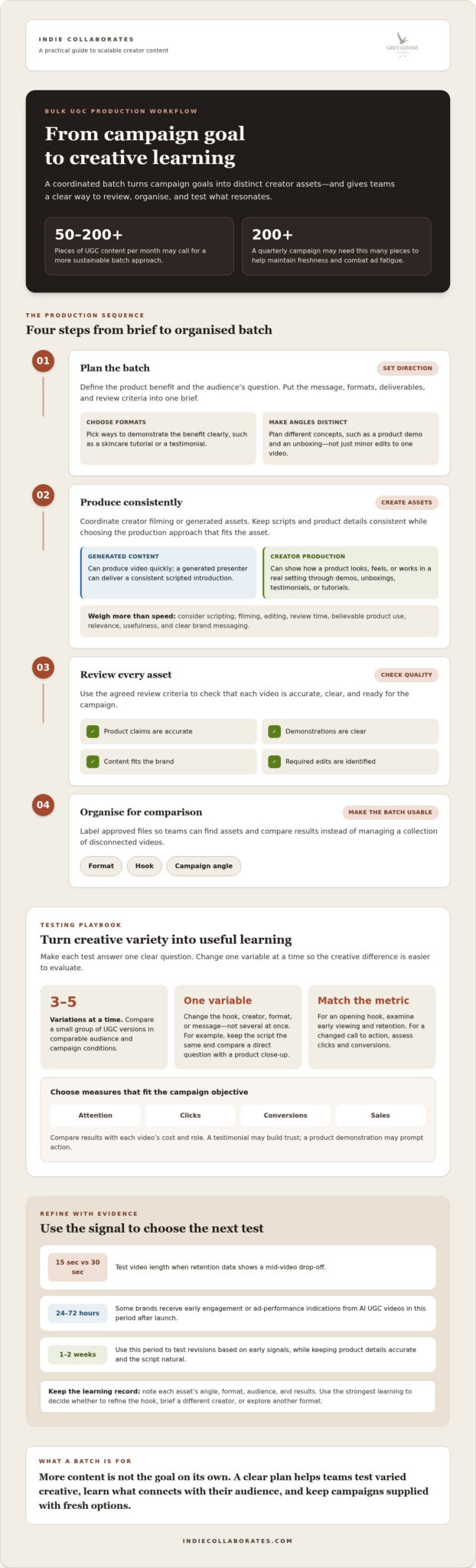
For brands that need 50-200+ pieces of UGC content each month, creating every asset one at a time quickly becomes difficult to sustain. Bulk UGC content creation makes it possible to build a wider set of creator-led assets, giving teams more creative to test and helping campaigns stay fresh.
That volume works only when it follows a clear plan. Choose a suitable mix of creators and formats, set consistent quality standards, and agree on payment and content usage rights. More content alone won’t make a campaign more effective; the value comes from learning which creative choices connect with your audience.
This guide explains why brands produce UGC in bulk and how to structure the process, from selecting creators and testing hooks to reviewing content and managing permissions. You’ll also learn what to consider when deciding whether a scalable production approach fits your campaign goals in Singapore.
Key Takeaways
- Set a clear campaign goal and test a small group of creative variations, changing one element at a time to learn what resonates.
- Choose creators for their audience fit, communication style, and ability to deliver the formats your campaign needs.
- Protect authenticity with a focused brief, clear quality standards, and room for creators to speak naturally.
- Agree on compensation, deliverables, and usage permissions before content is produced or used in marketing.
- Use scalable production when your campaign needs a coordinated pipeline of creator content, rather than simply more assets.
Why UGC content creation?
Brands create UGC in batches to keep campaigns supplied with fresh, varied creative. Production can use AI video tools or creator workflows, with editing tools such as Adobe Premiere, Final Cut Pro, and CapCut.
Choose an approach based on the asset you need: a generated presenter, a real product demonstration, or creator-led storytelling. AI tools can generate videos quickly, while creators can film unboxings, testimonials, lifestyle clips, and tutorials.
Generated Content and Creator Production Costs
Generated content and creator production solve different problems. AI tools can produce video quickly, while creators can show how a product looks, feels, or works in a real setting. Compare the time needed for scripting, filming, editing, and review with the campaign’s need for believable product use.
For example, a generated presenter can deliver a consistent scripted introduction, while a creator can demonstrate a product feature step by step. Assess whether generated voices and visuals suit the message and audience. Treat production speed as one factor, not a substitute for relevance, usefulness, and clear brand messaging.
Creative Fatigue and Production Delays
Creative fatigue sets in when audiences repeatedly see similar ads. A quarterly campaign may need 200+ pieces of content to maintain freshness and combat ad fatigue. That volume can include different hooks, testimonials, tutorials, and lifestyle clips, rather than minor edits to one video.
Production delays can leave campaigns short of alternatives when an asset underperforms. Traditional UGC campaigns may take weeks to plan, record, and approve. A batch workflow lets teams develop concepts and creator briefs together, then schedule reviews before launch. For example, plan a product demo and an unboxing as distinct creative angles.
Bulk Production Workflow
A reliable workflow turns campaign goals into a production-ready batch. Start by identifying the product benefit and the audience’s question, then choose formats that demonstrate the benefit clearly. A skincare tutorial, for instance, can show application steps, while a testimonial can focus on a customer experience.
- Plan: Define the message, formats, deliverables, and review criteria in one brief.
- Produce: Coordinate creator filming or generated assets, keeping scripts and product details consistent.
- Review: Check each video for accurate claims, clear demonstrations, brand fit, and required edits.
- Organise: Label approved files by format, hook, and campaign angle so teams can compare results.
This structure makes a batch easier to manage than a collection of disconnected files. It also helps brands keep messaging consistent while exploring distinct demonstrations and creative approaches.
Testing hooks, creators, formats, and angles
How should brands measure the performance and ROI of bulk UGC? Start with the campaign objective, then compare each video’s results with its cost and role. Track attention, clicks, conversions, and sales together. A testimonial may build trust, while a product demonstration may prompt action.
Make each test answer one clear question. Compare three to five UGC variations at a time, changing one variable, such as the opening hook, creator, format, or message. For example, keep the script the same and compare a creator’s direct question with a product close-up. This helps show what influenced the result instead of treating every creative difference as equally important.
Match the metric to the tested element. If the opening is under review, examine early viewing and retention; if the call to action changes, assess clicks and conversions. A 15-second video can be tested against a 30-second version when retention data shows a mid-video drop-off. Keep the audience and campaign conditions comparable so the creative is the main difference.
Test angles, not just edits. A testimonial, humorous skit, heartfelt account, and trend-driven reel can express the same benefit in distinct ways. Layoners collaborated with 93 creators for a swimwear launch, while Filippo Loreti performed three times as many tests after gathering a wider variety of UGC. These examples show how creative variety can expand testing options, not guarantee a particular result.
Generated videos need their own optimisation cycle. Some brands receive engagement or ad-performance indications from AI UGC videos between 24 and 72 hours after launch. Use those early signals to identify weak hooks or formats, then test revisions over one to two weeks. Check that a faster opening still preserves accurate product details and a natural script.
A regular testing rhythm helps teams respond to ad fatigue. When the same videos run repeatedly, prepare alternative hooks, creator styles, and demonstrations before performance declines. Record each asset’s angle, format, audience, and results. This helps teams avoid repeating weak ideas and gives agencies a clearer basis for the next creative brief.
For the next cycle, use creator content strategy to connect campaign objectives with testable creative choices. Prioritise the strongest learning, then decide whether to refine the hook, brief a different creator, or explore another format.
Authenticity and content quality
Authentic creator content balances a recognisable brand message with the creator’s natural delivery. A clear review process helps preserve that balance across every asset in a batch.
Revisions and Quality Assurance
Start with a brief that separates essential requirements from creative choices. List approved product details, required disclosures, visual guidelines, and prohibited claims, then let creators choose their own phrasing and delivery. For an Instagram skincare video, the brief might require a clear application demonstration while leaving the opening hook to the creator.
Review each draft against the checklist before requesting changes. Give specific, actionable feedback, such as correcting a product detail or improving audio clarity, rather than asking for a general “better” version. Grouping feedback into one revision round can help creators address related issues together and reduce unnecessary back-and-forth.
Quality Control at Scale
Scaling production calls for consistent checks, not identical performances. Apply the same review criteria to every video: factual accuracy, audible speech, a visible product, suitable framing, and alignment with the agreed message. Log each asset as approved, needing edits, or unsuitable, with a brief reason.
Keep a central tracker of creator name, file version, review status, and final approval. If several videos demonstrate a product, for example, check that each follows the same product instructions while retaining the creator’s distinct style. This makes quality issues easier to catch before assets reach the audience.
Authenticity can suffer when every creator reads the same word-for-word script. Give creators a message framework instead: the core benefit, supporting product facts, and a specific audience problem to address. A customer testimonial can then sound personal without making unsupported claims or changing the product’s meaning.
Use examples to clarify the standard you want. A sample video can demonstrate framing, pacing, and how clearly the product should appear, while a written checklist captures technical requirements. Don’t ask creators to copy the sample exactly. The goal is consistent clarity, not a series of indistinguishable performances.
Generated content needs its own quality review. For AI UGC used in advertising, avoid misleading claims and use licensed voices and avatars. Check that the generated speaker, product visuals, spoken script, and on-screen text agree. If a simulated demonstration suggests a product result, verify that it represents the product accurately before approval.
Use audience feedback to refine the next batch. If comments on an Instagram video reveal confusion about how a feature works, clarify that point in the next brief. A documented review process turns individual corrections into practical guidance, helping teams maintain accuracy while preserving creator-led expression.
Campaign briefs and creator selection
For Singapore campaigns, the best agency and creators are those whose experience, style, and audience fit the campaign objective. Choose partners who can coordinate the required volume, deliver clear briefs, and align creator content with your product and intended audience.
Briefing and Campaign Launch
Begin with the campaign objective, then define the audience, product message, deliverables, and approval process. A homeware unboxing brief, for example, can specify which product features to show and what viewers should understand, while giving the creator room to speak naturally.
Before production, agree on the submission format, review steps, and delivery schedule. Traditional UGC campaigns can take weeks to plan, record, and approve, so assign owners for feedback and sign-off early. A clear launch sequence helps creators start with the same product information and campaign priorities.
Standardized Content Briefs
A standardised brief gives every creator the same essential campaign facts without forcing identical scripts. Include the product description, approved claims, audience context, key message, required shots, and examples of suitable formats. For an unboxing video, specify which packaging or product details matter, then let creators choose their own opening and delivery.
Keep reusable sections consistent and tailor the creative prompt to each campaign. A single template can help prevent missing details across a large batch, while creator-specific notes address relevant styles or formats. This supports coherent messaging without making every asset feel interchangeable.
Choose creators based on the brief, not follower count alone. Review their portfolios for relevant product demonstrations, clear delivery, sound and visual quality, and a credible fit with the intended audience. For example, a creator who explains product features clearly may suit a tutorial better than someone whose work focuses on lifestyle storytelling.
Check whether a creator can produce the formats and volume the campaign needs. Bulk platforms may connect brands with large creator networks, but a broad pool is useful only when selection criteria are clear. Shortlist creators against the brief, then compare their sample work and communication style.
For a Singapore campaign, consider whether the creator’s content feels relevant to the audience and product context. A polished portfolio can show execution, but the brief should also test how the creator presents the specific product. Match each person to an angle, such as a testimonial, tutorial, or unboxing, before confirming assignments.
Organise the launch with a creator roster, brief version, assigned format, and approval status. This tracker helps teams spot gaps before filming begins, such as having several testimonials but no practical demonstrations. Clear assignments make a high-volume campaign easier to coordinate and review.
Payments and content usage rights
In Singapore, get a creator’s permission before using their UGC video in advertising or other marketing. Agree on any disclosure wording and where it appears before publication, so viewers can understand the content’s commercial context.
Payments for UGC
Creators may agree to compensation as a flat fee or a per-deliverable rate. Set the payment basis before production, then define what counts as a completed asset, such as an approved TikTok testimonial or a product demonstration delivered in the agreed format.
Record payment terms alongside the deliverables and review process. For example, state whether the agreed amount covers filming and editing or whether those tasks are separate. Clear terms help both parties understand what payment covers if a brief changes or another video is requested.
Content Usage Rights
Producing a UGC video doesn’t automatically give a brand permission to use it in every channel. Put agreed uses in writing before filming, including whether the brand may use the asset in paid advertising, organic social posts, or other marketing.
Describe the permission’s scope in plain language. For a TikTok video, identify the intended platform, whether paid promotion is included, and any agreed limits on editing or reuse. Make sure the creator understands the terms and approves the planned use before the asset goes live.
Track content delivery separately from usage permission. A creator may deliver a finished video while the brand still needs permission for its intended use. Record each asset’s creator, payment status, approved channels, and permission details to make selection and publishing easier across a batch.
Include disclosure decisions in the campaign brief. If a creator is paid to make a testimonial, specify the wording and placement, then review the final video before publication. Check that captions and on-screen text remain clear when the asset is adapted for different placements. Don’t assume the original caption will appear with a cropped or edited version.
For revisions, distinguish creative edits from changes to agreed usage. Correcting a product detail is different from extending an asset’s use to another channel. Document the requested change and obtain the creator’s agreement before using the revised video beyond the original permission.
A rights tracker can prevent confusion during campaign handoffs. Include fields for asset name, creator, payment arrangement, permitted channels, disclosure notes, and approval status. If a team member selects a video for a new placement, they can check whether that use falls within the recorded permission.
Plan creator content permissions alongside your campaign brief, payment terms, and publishing workflow.
Indie Collaborates: Influencer Marketing Campaigns
Indie Collaborates helps brands turn campaign objectives into creator-led content and measurable execution. Its Scalable UGC Production supports campaigns that need a coordinated range of assets, while Influencer Marketing Campaigns connect brands with creators for audience-facing promotion.
For teams planning creative tests, creator content strategy can align formats and messages with campaign goals. Campaign Performance Reporting helps teams review results and identify which creative approaches to develop further. These services suit brands that need structured creator collaboration, rather than content production in isolation.
To discuss your campaign needs, contact Indie Collaborates.
Turn your next campaign into a learning cycle
Your next campaign can do more than fill a content calendar. Treat each asset as a deliberate creative decision, then use what you learn to shape the next brief, creator selection, and production plan. Bulk UGC content creation can then become a repeatable way to build campaign knowledge, not simply a means of producing more videos.
Indie Collaborates offers Scalable UGC Production for brands building creator-led assets, Influencer Marketing Campaigns for audience-facing promotion, and Affiliate Programmes for creator-driven sales activity. Choose support that fits your campaign’s next priority, whether you’re developing content for testing or connecting creator activity with wider marketing objectives.
Ready to plan your next creator campaign? Contact Indie Collaborates to discuss a practical next step for your brand. Build with purpose, learn from each campaign, and give your next creative idea room to grow.
Frequently Asked Questions
How do you make UGC videos in bulk?
Plan a batch around one campaign objective, then give each video a distinct message or format. For a reusable water bottle, one creator could show how the lid works while another films a commute scene. Track each concept, creator, draft, and approval in a shared production document. This keeps assets organised and helps teams spot missing formats before launch.
What is User Generated Content?
User-generated content, or UGC, is content made by customers or creators that features or discusses a brand, product, or service. A customer’s unprompted review is one example; a creator’s commissioned product demonstration is another form of creator-made content. The distinction matters: paid creator content can feel personal, but brands should make its commercial context clear and get permission before using it in advertising.
What is a Bulk UGC Generator?
A bulk UGC generator is a digital tool or production system designed to create multiple content variations from shared inputs. These might include product information, a script, visual assets, or a chosen format. AI tools can generate videos, while creator-led production involves people filming content. Before using generated assets, review their claims, visuals, voice, and product details for accuracy and suitability.
What is bulk UGC content?
Bulk UGC content is a planned collection of creator-led or generated assets for a campaign, rather than a single standalone video. It could include testimonials, how-to demonstrations, product close-ups, and lifestyle scenes. Each asset should have a distinct purpose, such as explaining a feature or addressing a common customer concern. Organise assets by message and format so teams can select the right creative for each placement.
Why do ad accounts run out of creative?
Ad accounts don’t literally run out of creative; campaigns can simply have too few suitable assets to rotate or test. Repeated exposure to the same video may reduce audience interest, while a narrow set of concepts limits alternatives when an ad performs poorly. For example, a product campaign with only a testimonial may lack a clear demonstration. A planned creative pipeline gives teams more varied options to evaluate.
What is bulk UGC content creation?
Bulk UGC content creation is the planned production of multiple creator-led or generated assets for campaign use. It brings concept development, creator or tool selection, production, review, and file organisation together in a coordinated process. The goal isn’t simply to increase the asset count. Each video should serve a defined purpose, such as presenting a product benefit, answering a customer question, or testing a different creative approach.
How do brands plan and brief a bulk UGC campaign?
Brands can plan a bulk campaign by defining its objective, audience, key product information, deliverables, and approval process before production begins. Then assign each creator a specific format or message, such as an unboxing or feature demonstration. Give creators the facts and required points, but avoid scripting every word. A shared brief template helps maintain accuracy while allowing each creator’s delivery to feel individual.
What is the step-by-step process for producing UGC videos at scale?
Use a sequence that takes each video from idea to approved asset: choose the campaign objective, develop concepts, assign creators or a generation method, prepare briefs, produce drafts, review accuracy and quality, then approve and organise the final files. A tracker can show who owns each action and which assets need attention. For example, label each draft by creator, concept, and status so reviewers can find the right version.
