
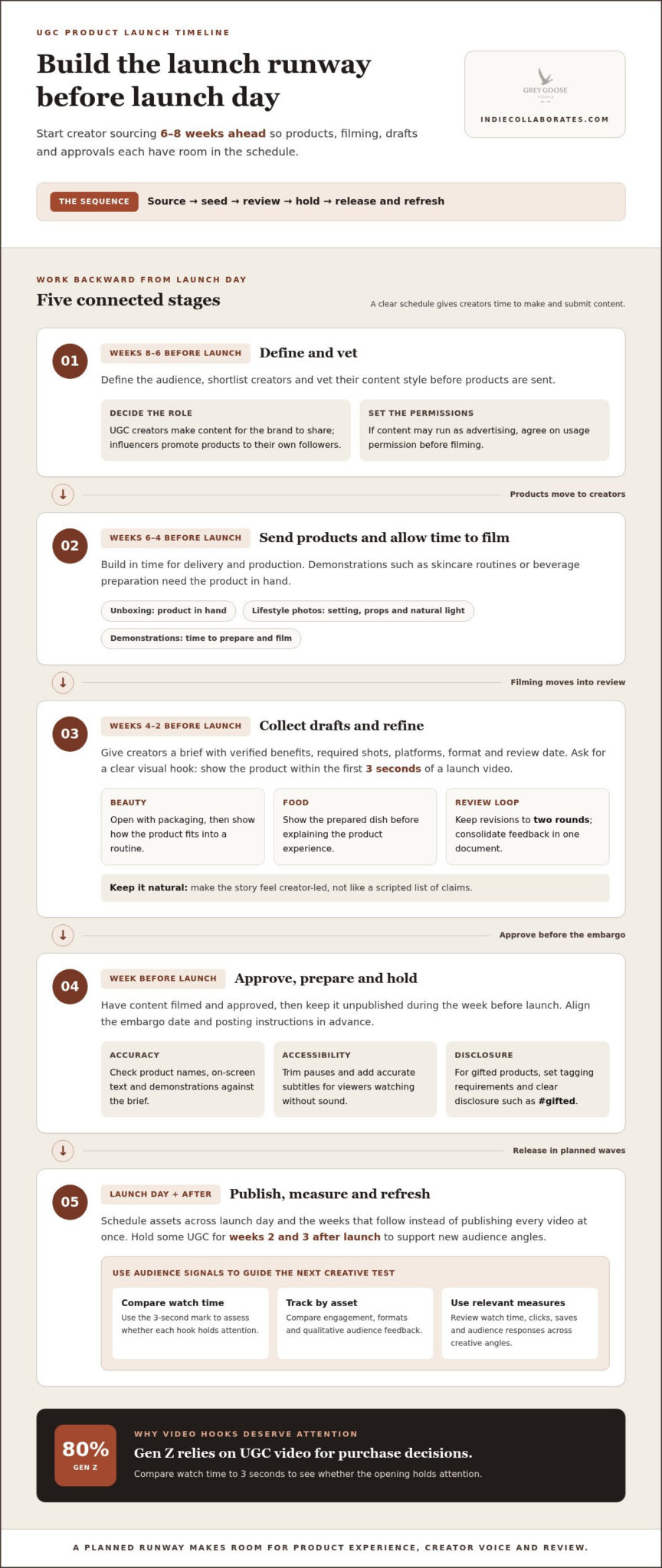
Strong launch UGC starts before launch day. Plan UGC for product launches 6-8 weeks ahead, beginning with creator sourcing and vetting before products are sent out. That lead time gives creators room to receive the product, make content and submit drafts for review.
It’s easy to focus on the launch date, but creator coordination and content approvals need their own runway. A clear schedule keeps production on track, while a considered budget helps balance asset volume, creator fees and usage rights against the launch’s needs.
This guide covers a practical seeding timeline, key cost factors and how to choose human, AI or hybrid content. It also explores how food, beauty and beverage brands can turn product experiences into launch-ready stories, from unboxings and demonstrations to creator-led reviews. Use the framework to plan authentic content and leave room to test different creative angles.
Key Takeaways
- Begin creator sourcing and vetting 6-8 weeks before launch, then build in time for product delivery, drafts and approvals.
- Manage production costs by defining deliverables and usage rights upfront, and keeping revisions to two rounds.
- Choose human, AI or hybrid creative based on whether the launch needs real product experiences, adaptable assets or a mix of both.
- Make product demonstrations tangible with formats such as unboxings, lifestyle photos and step-by-step tutorials.
- Explore how food, beauty and beverage brands can use creator stories, hashtags and launch challenges to invite community participation.
How early should I start seeding UGC creators before a product launch?
- Plan UGC for product launches 6-8 weeks before launch day. Use weeks 8 to 6 before launch to define the audience, shortlist creators and vet their content style. Then send products during weeks 6 to 4 before launch, allowing time for delivery and filming. This schedule matters for products that need demonstrations, such as skincare routines or beverage preparation. An unboxing video needs the product in hand, while lifestyle photos may also require suitable settings, props and natural light.
- Use weeks 4 to 2 before launch for first drafts and revisions. Give creators a clear brief covering the product’s verified benefits, required shots, platforms, format and review date. Ask for a strong visual hook: show the product within the first three seconds of a launch video. A beauty creator might open with the packaging, then demonstrate how the product fits into a routine. A food creator could show the prepared dish before explaining the product experience. Keep the story natural, not scripted as a list of claims.
- Decide whether you need content for your brand’s channels or creator reach. UGC creators produce content for brands to share; social media influencers promote products to their own followers. For gifted products, include tagging requirements and a clear disclosure, such as #gifted. For sponsored UGC in Singapore, make the commercial relationship easy to recognise in the post and video. If the content may run as advertising, agree on usage permission before filming.
- Edit for clarity and accessibility without removing the creator’s voice. Keep the opening focused, trim pauses, and add accurate subtitles so viewers can follow the message with sound off. Review product names, on-screen text and demonstrations against the brief. UGC video can matter at the purchase stage: 80% of Gen Z relies on UGC video for purchase decisions. Measure UGC for product launches using engagement metrics, content formats and qualitative feedback. Compare watch time to 3 seconds to assess whether each hook holds attention, then use audience responses to shape the next creative test.
- Prepare launch assets before the final week. Have content filmed and approved, then hold it unpublished during the week before launch. A first-impression review or unboxing can influence potential buyers soon after release, so align the embargo date and posting instructions in advance. A tutorial can explain how to use the product, while lifestyle photography shows how it fits into daily routines. Together, these formats help audiences understand the product from different angles.
Cost-efficiency of customer-created content
- Set the budget around usable assets, not creator count alone. List the formats, channels, usage rights and launch dates each asset needs to support. Then account separately for product costs, creator compensation, shipping, editing and paid-amplification rights. Creators may receive a flat fee, a per-deliverable rate or another agreed form of compensation. Assess the full production scope and the value of having varied photos, videos and testimonials to test, rather than comparing a single asset with one hero advertisement.
- Build quality checks into the brief before production begins. Ask creators to show genuine product experiences and avoid scripted claims they can’t personally support. For a skincare launch, request clear footage of the application rather than a testimonial claiming an unverified result. Review portfolios for consistent work and product-specific detail. Check submitted files for duplicated footage, mismatched packaging and details that conflict with the product brief. Authenticity comes from credible experiences, not from leaving generated content unreviewed.
- Limit revisions to two rounds and give each a clear purpose. In the first, address factual issues, missing shots and brand requirements. In the second, finalise edits such as captions or pacing. Collect feedback in one document so creators don’t receive conflicting notes. This reduces avoidable rework while preserving a natural voice. Set acceptance criteria before filming, such as clear product visibility, correct names and usable audio, to make quality decisions consistent.
- For a group of 20 creators, divide delivery into four waves of five, with deadlines three to four days apart. This gives the team manageable review batches and time to address issues before the embargo lock date. Schedule assets across launch day and the weeks that follow, rather than publishing every video at once. Hold some UGC back for weeks two and three after launch. Fresh photos, demonstrations and testimonials can then support new audience angles as initial creative begins to feel repetitive.
- Track performance by asset and creative angle, not only total spend. Compare watch time, clicks, saves and audience feedback across formats, then use the strongest signals to guide the next brief. A creator content strategy can help connect these decisions to production priorities, especially when several teams share review duties. For a launch with varied deliverables, consider structured creator content strategy to organise briefs and creative testing. Keep the budget flexible enough to prioritise the formats that generate useful learning.
UGC for Launch: Human Creators, AI, or Hybrid?
Build the timeline backwards from launch day: source and vet creators during weeks 8 to 6 before launch, deliver products during weeks 6 to 4, and collect drafts during weeks 4 to 2. Have approved assets ready but unpublished during the week before launch.
- Choose the production model by the content’s job. Human creators bring firsthand product experiences and individual perspectives. AI-generated assets can help explore concepts or adapt messaging, but they can’t provide a genuine personal experience. A hybrid approach pairs creator footage with AI-assisted variations, while keeping product details and claims under human review. Choose the balance based on whether credibility, rapid iteration or both matter most.
- Set the campaign scope before recruiting. Identify the audience, platforms and advertising angles, then prepare at least 3-4 creator-content pieces for each angle. A product launch should have 15-20 pieces ready to go live in its first 48 hours. Plan to produce at least 20 to 30 UGC videos during the first month, so the team can learn from launch performance and refresh creative.
- Write a brief creators can act on. State the product facts, required shots, deliverables, deadlines, embargo date and time in the creator’s local timezone. Specify whether the content is for TikTok, Instagram, organic posts or paid advertising. For gifted products, include tagging requirements and the correct disclosure, such as #gifted. Agree on paid-amplification usage rights in writing before filming.
- Plan production speed around approvals. A market comparison estimates that hiring UGC creators takes 1 to 3 weeks to launch, while social media agency timelines are estimated at 2 to 4 weeks. Treat those as planning estimates, not a substitute for your own review schedule. Product delivery, feedback rounds and legal or brand approvals can all affect the pace. Assign one decision-maker to consolidate comments and keep drafts moving.
- Seed beyond the final asset count and build repeatable relationships. Send products to 30-40% more creators than the number of final content pieces needed. This creates room to select work that fits the brief. Invite early adopters to share honest experiences, then track which formats and messages resonate. Keep strong creators connected through online groups or creator communities, where shared learning can support future campaigns. For launch planning, distinguish gifting from paid deliverables and make expectations clear for each.
Authentic product experiences and demonstrations
- Show the product doing its job. Ask creators to demonstrate a real use case rather than repeat a list of claims. A kitchen-tool video could show preparation, use and cleanup in sequence. A skincare creator could explain where a product fits into a routine. Clear demonstrations let viewers judge practical details for themselves. Keep product names, instructions and stated benefits accurate in every shot and caption.
- Give creators guardrails, not a word-for-word script. A rigid script can make an experience sound staged. Instead, provide key facts, required visual moments and claims to avoid. Invite creators to describe what they noticed in their own words. For example, ask them to show how a bottle opens, then share their genuine reaction. This structure supports accuracy while leaving room for a distinctive voice.
- Make reviews balanced and specific. Encourage creators to explain what they liked and mention a relevant limitation when it reflects their experience. A review might praise a product’s compact packaging while noting that its cap takes practice to close. Don’t remove a truthful, relevant observation just because it’s less flattering. Authentic reviews give social media viewers useful context and distinguish real experiences from polished sales messages.
- Use proof viewers can see. Include close-up shots, clear demonstrations and details that support the creator’s statements. If a creator describes a texture, show the product being applied. If they discuss packaging, capture the label and opening process. User-generated content can feel more credible than traditional advertising: 92% of consumers trust it more. Treat that figure as a reason to preserve real experiences, not as a promise of audience response.
- Review for authenticity and conversion together. Check that the edit keeps the creator’s natural delivery, identifies the product clearly and doesn’t imply unsupported results. Visual user-generated content can increase conversion rates by up to 20-25% when integrated into product pages or marketing campaigns. Treat that as potential, not a guaranteed outcome. Compare performance by placement, then refine the next brief. A product-page demonstration may answer practical questions, while a short social video may introduce the product to new viewers.
Campaign examples from food, beauty and beverage brands
- Start with a product experience people can show. Food campaigns can invite creators to prepare, taste and serve a new item. Only Organic gifted its new soups to 100 creators for a UGC campaign. More than half of recipients completed a questionnaire about the soup and their experience. The useful lesson is to pair content with feedback: a tasting video can show reactions, while a questionnaire can capture details that footage may miss.
- Turn beauty routines into useful demonstrations. A beauty launch can ask creators to show how a product fits into a routine, with close-ups that make texture, application or packaging visible. A Dyson Airstrait gifting campaign generated 164 pieces of UGC. That example illustrates how gifting can produce a range of creator assets. For a new launch, brief creators on the experience to capture, but leave room for their own delivery and honest observations.
- Give beverage creators a simple, repeatable moment. For a new drink, a creator might show the pour, colour, serving suggestion and first taste. Ask for specific sensory feedback in their own words rather than supplying a testimonial script. Different creators can present the same beverage in distinct settings, such as a morning routine or a shared meal. This creates varied social proof without requiring every video to tell the same story.
- Build participation around a clear prompt. Hashtags, challenges and contests can invite customers to share launch experiences. A food brand might ask people to show a recipe using its new ingredient; a beauty brand could invite routine clips. Make the prompt easy to understand and tie participation to the product experience. Review the resulting content and feedback for useful themes, questions and creative angles. Engagement can inform the next campaign brief.
- Match creator roles to the campaign goal. UGC creators make content a brand can publish, while an influencer promotes a product to their own followers. A food launch may need recipe demonstrations; a beauty launch may benefit from routine-led reviews; a beverage launch may need varied serving moments. Set the brief, usage permissions and measurement around that objective. To structure a campaign around the right creator roles and launch content, plan an influencer marketing campaign.
Indie Collaborates: Influencer Marketing Campaigns
Indie Collaborates helps brands turn launch plans into creator-led campaigns through Influencer Marketing Campaigns and Scalable UGC Production. Turn to the team when creator sourcing, content production and campaign coordination need to work together, or when you want a structured approach to testing launch creative.
For a launch focused on sales, Affiliate Programmes can support creator-led promotion. Creator Content Strategy and Campaign Performance Reporting help connect content choices to campaign objectives and performance insights. The right mix depends on whether your priority is producing assets, reaching creator audiences or building an affiliate programme.
Planning a creator campaign for an upcoming product launch? Visit indiecollaborates.com to discuss your campaign.
Turn Launch Content into Your Next Growth Opportunity
Your launch can be the start of an ongoing relationship with your audience. Treat each creator collaboration as a chance to learn which product stories feel clear, useful and worth sharing. This helps UGC for product launches contribute beyond launch day, informing future creative decisions and customer conversations.
Indie Collaborates supports brands with Influencer Marketing Campaigns, Scalable UGC Production and Affiliate Programmes. These services can connect creator-led content with different campaign goals, from producing assets to supporting creator promotion. Identify the role you need most, then build a plan around your product, audience and launch objectives.
Ready to shape the next step for your launch? Contact Indie Collaborates to plan your launch. A considered creator strategy can help your team move forward with focus and purpose.
Frequently Asked Questions
Can I use AI UGC for my launch without showing my face?
Yes, launch content can feature hands, product close-ups, screen recordings, voiceover or animation instead of a creator’s face. For example, a creator could film a product being unpacked and demonstrated, then add narration. Keep product details accurate and don’t present a generated person as a real customer. If the content implies a personal testimonial, base it on a genuine experience rather than an invented one.
How is a product launch UGC brief different from a regular UGC brief?
A launch brief needs to coordinate content with the release plan, not just describe the asset. Include approved product details, audience, content angle, publishing restrictions, review deadlines and where each asset will appear. For example, a brief for a new beverage might request a preparation demonstration for launch and reserve a separate creator reaction for later. Specify who approves drafts and how creators should handle confidential launch information.
Should I run all my UGC content on launch day?
No. A single-day content burst can leave little fresh creative for the next phase. Assign different assets to different moments: a product introduction for release, a practical demonstration after initial interest, and customer feedback to address questions that arise. Keep a simple publishing calendar listing each asset, channel, audience and purpose. This helps maintain momentum without making every post repeat the same message.
What is UGC and why is it important?
User-generated content is content created by customers or creators about a product or brand. It can include a review, photo, short video or demonstration. For a launch, a useful asset might show how packaging opens or how a product fits into a daily routine. This gives prospective buyers concrete context and provides the brand with varied material for product pages, social posts and campaign testing.
What is a UGC content creator?
A UGC content creator produces brand-related material such as product photos, demonstrations or testimonials. Their role is to create content a brand can use, rather than relying only on the creator’s own audience for distribution. For example, a creator might film a tutorial for a new kitchen product that the brand then shares on its channels. Clear briefs and agreed usage permissions help define the collaboration.
What makes a good UGC script for a launch?
A strong script gives the creator a clear sequence while leaving room for natural delivery. Start with a specific opening, introduce the product, show a practical use and end with a relevant next step. For a new snack, the creator could show the packaging, honestly describe the tasting experience and explain where they would enjoy it. Keep claims factual and avoid words that suggest results the creator hasn’t experienced.
What is UGC and how can brands use it for product launches?
UGC is content made by customers or creators that shows a product from an individual’s perspective. Brands can plan launch assets for different purposes: a short introduction can build awareness, a demonstration can answer usage questions, and a review can offer a personal viewpoint. For example, a homeware brand might use a setup video on social media and product photos on its product page, with permissions agreed beforehand.
What UGC formats work best for product launch campaigns?
The best format depends on what people need to understand about the product. Unboxing content reveals packaging and first impressions; a tutorial explains how to use an item; lifestyle photos show it in context; and a testimonial shares a creator’s own experience. A product with a learning curve may benefit from a step-by-step video, while a visually distinctive item may be clearer through close-up photography.
